
Importing a listing means pasting the URL of an Amazon or AliExpress product so MitikLive fetches the title, description and photos for you to publish them on your Wallapop and Milanuncios accounts. No downloading images one by one or rewriting every listing by hand.
🎯 Ideal if you…
- Buy Amazon/AliExpress auctions, lots or bargains to resell
- Sell the same product on several accounts or marketplaces
- Want to publish fast without losing photos or descriptions
What Is Listing Import?
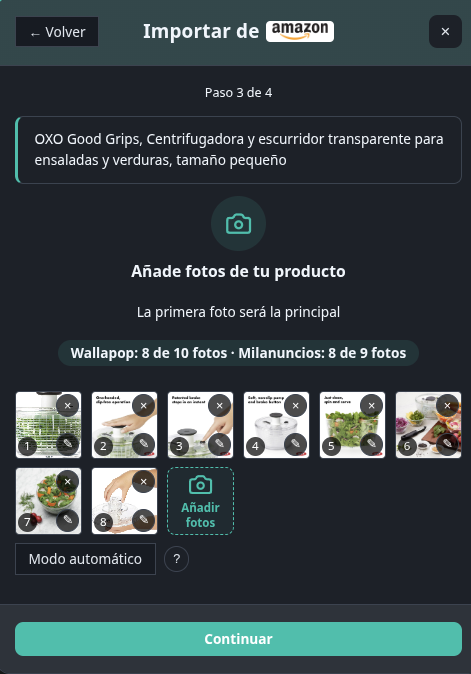
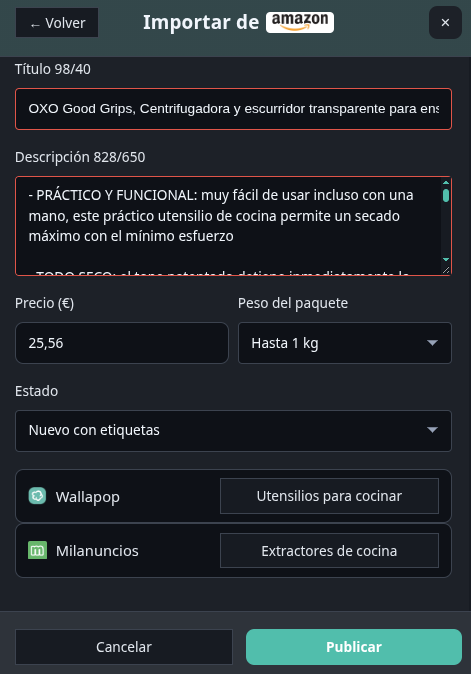
Instead of creating the listing from scratch, you paste the product link and a wizard opens with a preview: pre-filled and editable title and description, product photos and the source price as a reference. You review, pick the destination category and publish.
Everything in the preview can be changed before publishing: nothing goes live without your review.
When Is It Worth It?
- Auction and lot resale: the original listing already has good photos and description; reuse it in minutes
- Repeated catalog: the same product on Wallapop and Milanuncios without duplicated work
- Multiple accounts: publish the same product on each account from one place
⚠️ Before publishing:
- Check the photos match the actual product you sell
- Adjust the price to your margin, not the Amazon/AliExpress price
- Make sure the product follows the destination marketplace rules
Import Step by Step
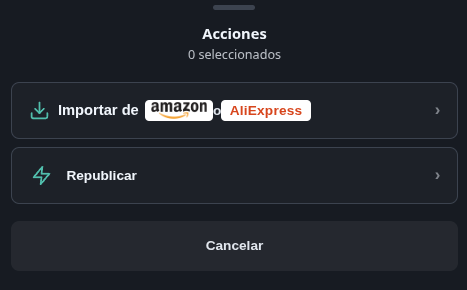
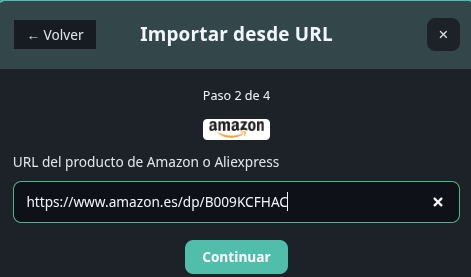
- Copy the URL of the Amazon or AliExpress product
- Paste it in MitikLive with the “Import from URL” button
- Review the preview: title, description and photos come pre-filled and editable; the source price is pre-loaded as a reference
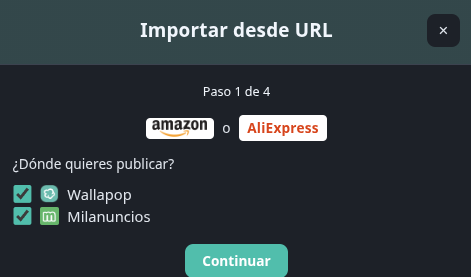
- Pick the destination: Wallapop or Milanuncios account and official category
- Complete what each marketplace asks (final price, condition, and little else depending on the category)
- Publish and follow the progress bar until you see the per-destination confirmation
💡 Key advantage:
Each destination costs 1 credit, like regular cross-posting. If a destination is missing a required field, the wizard asks for it before publishing: nothing gets stuck halfway.
From PC or Mobile
- On PC: copy the URL from the browser bar and paste it in the app or extension
- On mobile: use the product Share button and paste the link in the MitikLive app
The rest of the flow is the same: editable preview, destination category and publishing with progress. Available in the extension and the Flutter app.
Wallapop and Milanuncios
| Aspect | Wallapop | Milanuncios |
|---|---|---|
| Source | Amazon or AliExpress URL | |
| Auto-fetched | Title, description, photos and reference price | |
| Category | Official browser with preselection | Official browser with preselection |
| Review before publishing | Always: everything is editable | |
| Cost | 1 credit per published destination | |
FAQ
Does it publish without review?
No. You always see the preview and can edit title, description, photos and price before publishing.
Does it work for Vinted?
For now the importer covers Wallapop and Milanuncios. Vinted is not included in this first version.
Do photos lose quality?
No. Product gallery images are imported at their available original resolution.
Can I import the same product to several accounts?
Yes. Repeat the destination per account from the same wizard, at 1 credit per publication.
Start Selling More Today
Automate renewals and republications with no subscription. Your listings always on top, effortlessly.
Start freeNo card · No subscription · Up to 10 accounts